Skip to content
Transcribe

Voice memo to text, kept on your device

Turn spoken notes into written ones: pick a saved memo or record a new one and get the text in moments.

  • Nothing uploaded
  • No sign-up
  • Free
or drop it here · MP3 WAV M4A MP4 MKV MOV FLAC OGG
Nothing is uploaded
How it works

Three steps, all on your device

  1. Pick a memo, or record one

    Choose a saved voice memo from your phone or computer, or press Record and say what is on your mind.

  2. Read it back as text

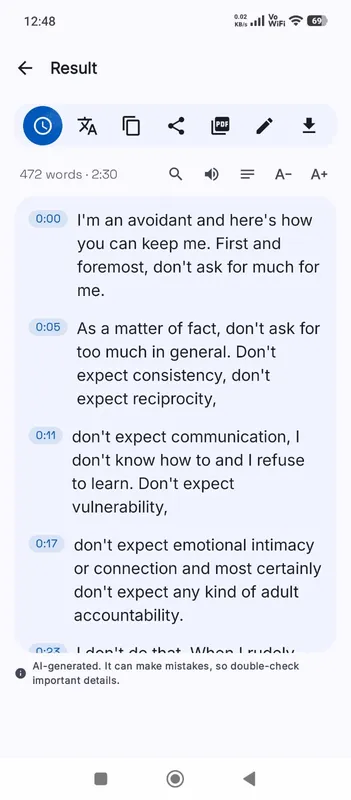
    The Local AI engine writes the memo down on your device. A recording shows a live draft while you speak.

  3. Put it where it belongs

    Copy the text into your notes, a message or a task list, or save it as a document.

Why it works

Why OmniaScribe

  • Thoughts stay private

    Diary entries, ideas and reminders are never sent to a server.

  • Record right here

    No separate recorder needed: press Record and watch the words appear.

  • Offline once set up

    After the model is downloaded, memos are transcribed without a connection.

Notes you can search

Voice memos are the fastest way to catch an idea, but they pile up. After a few weeks nobody wants to listen through forty clips to find the one with the address or the plan for the weekend. Written down, those memos become notes you can skim and search. Transcribe each one as it comes in, and the History screen keeps them all on this device. Find a memo by its title, then search inside it for the word you remember.

Two ways to start

If the memo is already saved, pick it: iPhone Voice Memos and most Android recorders save M4A, which opens directly. If you are about to speak, press Record on the card instead. The recorder shows a live draft as you talk, and when you press Stop the whole recording is transcribed again with your chosen model for the final text. You can pause and carry on in the same recording.

Recording in the browser keeps the audio on this device too. Your browser asks once for permission to use the microphone; nothing is captured until you allow it and press Record.

Speaking for a clean transcript

Hold the phone about a hand’s width from your mouth and speak at your normal pace. You do not need to say punctuation: the model adds full stops and commas from how you speak. Short pauses between thoughts help it split the text into lines. Spell out unusual names once if they matter, then fix them in the text with Edit.

Memos in other languages

OmniaScribe transcribes memos in many languages. If you switch between languages from one memo to the next, leave the spoken language on Detect automatically. If you always speak the same language, set it once in the workspace and it is remembered. To read a memo in English, tick Translate to English before you start, with a multilingual model.

Where the memo is kept

Both the transcript and the recording are saved in History in this browser on this device. They are not synced to other devices or to an account, because there is no account. Delete a memo from History when you no longer need it, or clear all of them in Settings.

Clearing your browser’s site data also removes them, so export anything you want to keep. A weekly habit works well: copy the week’s memo transcripts into your notes app, then delete the recordings you no longer need to free up storage on the device.
Specs

Formats and limits

Audio
MP3, WAV, M4A, AAC, FLAC, OGG, OPUS
Video
MP4, MOV, MKV, WEBM
Export
TXT, PDF, DOCX, SRT, VTT
Languages
99, or detect automatically
Longest file per model
ModelComputerPhone
Fast3 h1 h 30 min
Standard2 h1 h
High accuracy1 h30 min

Files that would take more than about 45 min on your device ask before they start.

FAQ

Questions, answered.

Something else on your mind? Email us and a person replies.

Are my voice memos uploaded?

No. Saved memos and new recordings are transcribed in your browser on this device. Nothing is sent to a server.

Can I record a new memo here?

Yes. Press Record on the card. A live draft appears while you speak, and the final text is made when you stop.

Which memo formats work?

M4A from iPhone and most Android recorders, plus MP3, WAV, OGG, OPUS and other common audio files.

How long can a memo be?

On a computer, Fast handles up to 3 h, Standard handles up to 2 h, High accuracy handles up to 1 h. On phones it's half of that. Most memos are far shorter.

Do my memos sync to my other devices?

No. They stay in History in this browser. Export the text if you want it somewhere else.

Do I need to say “full stop” or “comma”?

No. Speak naturally; punctuation is added from the way you speak.

Guides

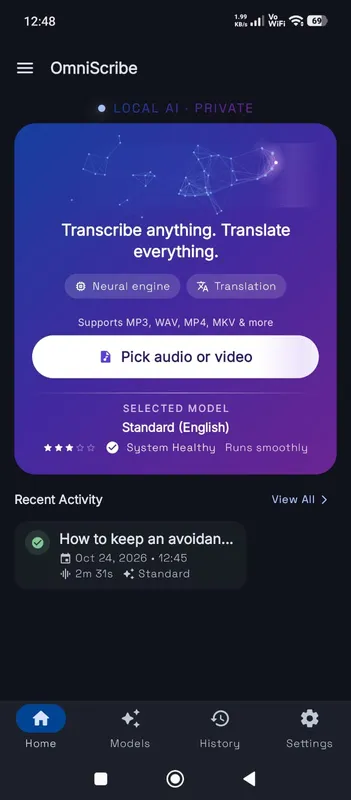
OmniScribe for Android

Transcribe anywhere.
No signal needed.

Install the free Android app and turn recordings into text on your phone, even with the screen off. Your audio never leaves the phone.

  • Works offline after a one-time model download
  • Translates offline, too
Get it on Google Playfree with ads · optional Pro
The OmniScribe home screen