Skip to content
Use cases

Transcribe an interview without sharing it

Turn a recorded interview into timed text you can quote from, without the recording ever leaving your device.

  • Nothing uploaded
  • No sign-up
  • Free
or drop it here · MP3 WAV M4A MP4 MKV MOV FLAC OGG
Nothing is uploaded
How it works

Three steps, all on your device

  1. Pick the recording

    Audio from a recorder, a phone or a video call export. Set the language the interview was held in.

  2. Get a timed transcript

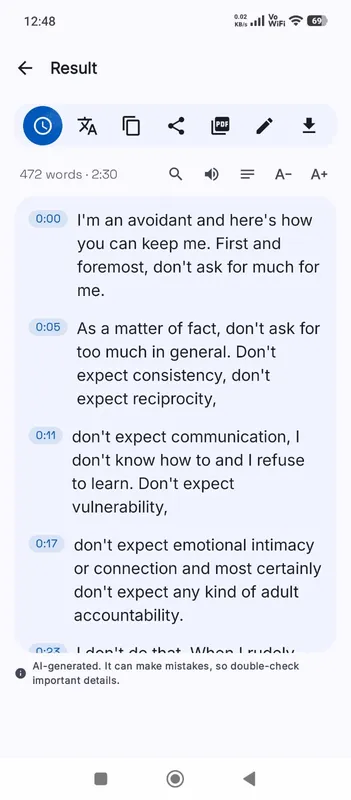
    The Local AI engine transcribes on your device. Every line keeps the moment it was said.

  3. Check quotes and export

    Click a line to hear the exact words before you quote them, add speaker names, and save DOCX or TXT.

Why it works

Why OmniaScribe

  • Protects your sources

    Off-the-record remarks and research participants’ voices never reach a third-party server.

  • Verify every quote

    Each line links back to its moment in the recording, so checking a quote takes one click.

  • Add names and fix terms

    Edit in place to mark who is speaking and correct names and jargon.

  • Ready for your notes

    Export DOCX for a write-up, or TXT for coding software and spreadsheets.

Why privacy matters for interviews

An interview recording is often the most sensitive file a journalist, researcher or recruiter holds. Sources speak on condition of anonymity, research participants sign consent forms that limit who may hear them, and candidates share details about their health or past jobs. Uploading that audio to a transcription service hands a copy to a company you have no agreement with. Here, the recording is transcribed by your own browser and never sent anywhere, so the only copies are the ones you already had.

Recording for a good transcript

The microphone matters more than anything else. Place the recorder or phone between the two of you, closer to the person being interviewed, on a soft surface so it does not pick up taps on the table. Choose a quiet room with furniture or curtains, which cut echo. In a video call, record each side’s audio if your software allows it, because one clear track per person beats a mixed room recording.

Ask the person to say their name and role at the start. It gives you a reference for spelling and a moment of clean speech that helps if you rely on language detection.

Marking who said what

OmniaScribe gives you one stream of timed lines; it does not tell voices apart yet. For a two-person interview this is rarely a problem, because questions and answers alternate. Open Edit and type a short label such as “Q:” or the person’s initials at the start of each answer. In a panel interview with several voices, label lines as you listen back with the player.

Quoting accurately

Automatic transcripts are excellent for finding the part you need but should not be quoted unchecked. Before a quote goes into print, click its line and listen. Listen for words the model may have smoothed over: a “didn’t” heard as “did”, a number, a name. The timestamp also helps if an editor or ethics board later asks where a quote came from.

Long and multilingual interviews

A long oral-history interview can run past what a model handles on your device; the workspace tells you before it starts. Split it at a natural break and transcribe both halves. For an interview in another language, choose that language, or tick Translate to English to get an English working transcript straight from the speech.

Translated quotes need extra care: keep the original-language transcript too, and check the wording with a fluent speaker before you publish a translated quote.
Specs

Formats and limits

Audio
MP3, WAV, M4A, AAC, FLAC, OGG, OPUS
Video
MP4, MOV, MKV, WEBM
Export
TXT, PDF, DOCX, SRT, VTT
Languages
99, or detect automatically
Longest file per model
ModelComputerPhone
Fast3 h1 h 30 min
Standard2 h1 h
High accuracy1 h30 min

Files that would take more than about 45 min on your device ask before they start.

FAQ

Questions, answered.

Something else on your mind? Email us and a person replies.

Is the interview recording uploaded anywhere?

No. It is transcribed in your browser on your device. The only download is the speech model, once.

Does it label the interviewer and the guest?

Not automatically. Add labels with Edit; each line keeps its timing.

How long can an interview be?

On a computer, Fast handles up to 3 h, Standard handles up to 2 h, High accuracy handles up to 1 h. On phones it's half of that. Split longer interviews into parts.

Can I use it for research interviews under a consent agreement?

The recording and transcript stay on your device, which helps with most data rules. Check your own agreement and storage rules too.

Which export is best for a write-up?

DOCX for Word or Google Docs, TXT for analysis software, and PDF to share a read-only copy.

Can I transcribe a video call recording?

Yes. Pick the exported audio or video file. Video files work too; only their sound is transcribed.

Can I translate an interview into English?

Yes. Tick Translate to English before you start, with a multilingual model.

Guides

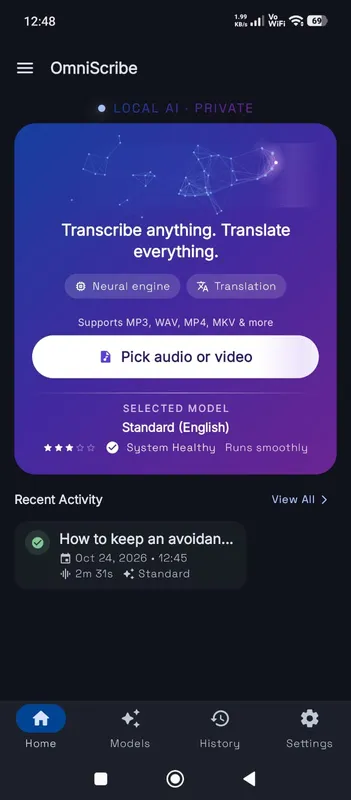
OmniScribe for Android

Transcribe anywhere.
No signal needed.

Install the free Android app and turn recordings into text on your phone, even with the screen off. Your audio never leaves the phone.

  • Works offline after a one-time model download
  • Translates offline, too
Get it on Google Playfree with ads · optional Pro
The OmniScribe home screen