Skip to content
Transcribe

MP4 to text without uploading the video

Pick an MP4 and get a timed transcript of what is said in it, made on your own device.

  • Nothing uploaded
  • No sign-up
  • Free
or drop it here · MP3 WAV M4A MP4 MKV MOV FLAC OGG
Nothing is uploaded
How it works

Three steps, all on your device

  1. Pick the MP4

    A phone video, a screen recording, a webinar export or a downloaded clip. Drop it on the card or pick it.

  2. Only the sound is decoded

    The browser pulls the audio track out of the MP4 and the Local AI engine transcribes it, line by line.

  3. Copy, save or subtitle

    Use the text as notes or an article draft, or export SRT and VTT subtitles timed to the video.

Why it works

Why OmniaScribe

  • Big files, no wait

    A gigabyte of MP4 is not sent anywhere, so there is no upload bar to sit through.

  • Private recordings stay private

    Client calls, unreleased edits and family videos never leave your device.

  • Subtitles from the same text

    One transcript gives you SRT and VTT files with start and end times.

  • Fix it before you use it

    Correct names and terms in place; exports use your corrected text.

What is inside an MP4

An MP4 file is a container. It holds a video track, one or more audio tracks and some timing information. Almost every phone, camera, screen recorder and video app saves MP4, and the sound inside is nearly always AAC, which all modern browsers decode natively. That is why MP4 is the most reliable video format to transcribe here: the browser does the decoding, and the speech model only ever sees the sound.

Screen recordings and webinars

Screen recordings are some of the best material for transcription. The speaker usually sits close to the microphone, there is little background noise, and the pace is steady. A transcript turns a recorded tutorial into written steps, a product demo into notes for the team, and a webinar into a draft blog post. Search the result for a feature name and jump straight to where it was explained.

Webinar exports often run long. Check the length shown in the workspace before you start: if it is near the limit, the Fast model may be the better choice on a phone, while a laptop can usually run Standard.

Phone videos

Videos filmed on a phone tend to pick up wind, traffic and room echo, because the microphone is far from the person talking. The transcript will still catch most of what is said, but expect more mistakes on quiet or distant voices. If the video is in a language other than English, choose that language in the workspace instead of relying on detection, especially when the clip opens with music.

Large files and storage

Because nothing is uploaded, file size matters much less than length. OmniaScribe decodes only the sound, so a 4K clip and a 720p clip of the same length take about the same time. The finished transcript is saved in History on this device together with the file, so the player keeps working later. If your browser’s storage is full, the transcript is still saved, just without the player.

From MP4 to captions

To caption the video, export SRT for YouTube, Vimeo and most editors, or VTT for a web player. Lines are split into short cues and keep their timing. If you want the words drawn into the picture itself, Viditool, our sister site, can burn an SRT file into the MP4.

For an article or a blog post, turn timestamps off and copy the text. Spoken language is looser than writing, so expect to cut filler and repeated starts, but the structure and the examples are already there.
Specs

Formats and limits

Audio
MP3, WAV, M4A, AAC, FLAC, OGG, OPUS
Video
MP4, MOV, MKV, WEBM
Export
TXT, PDF, DOCX, SRT, VTT
Languages
99, or detect automatically
Longest file per model
ModelComputerPhone
Fast3 h1 h 30 min
Standard2 h1 h
High accuracy1 h30 min

Files that would take more than about 45 min on your device ask before they start.

FAQ

Questions, answered.

Something else on your mind? Email us and a person replies.

Is my MP4 uploaded?

No. The video is opened in your browser, its sound is decoded there, and the Local AI engine transcribes it on your device.

My MP4 will not open. What can I do?

A few MP4 files use a sound codec your browser cannot decode. The workspace then tries a second decoder. If that fails too, export the video again with AAC audio, or convert just the sound to MP3.

How long can the MP4 be?

On a computer, Fast handles up to 3 h, Standard handles up to 2 h, High accuracy handles up to 1 h. On phones it's half of that. The length of the sound track counts, not the file size.

Does the video resolution matter?

No. Only the sound track is decoded, so a 4K video takes about as long as a small one of the same length.

Can I get an SRT file from my MP4?

Yes. Export SRT or VTT on the result. Each cue is timed to the speech in the video.

Does it read words shown in the video?

No. Only speech is transcribed. Slides, titles and burned-in captions are not read.

Guides

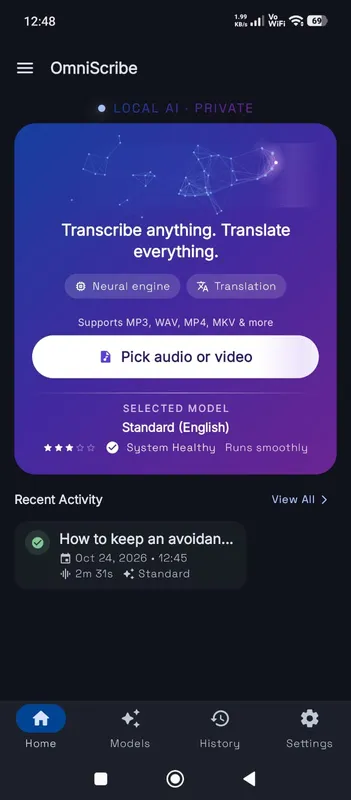
OmniScribe for Android

Transcribe anywhere.
No signal needed.

Install the free Android app and turn recordings into text on your phone, even with the screen off. Your audio never leaves the phone.

  • Works offline after a one-time model download
  • Translates offline, too
Get it on Google Playfree with ads · optional Pro
The OmniScribe home screen