Skip to content
Use cases

Podcast transcription for every episode

Turn each episode into a timed transcript for show notes, captions and your website, without uploading the audio.

  • Nothing uploaded
  • No sign-up
  • Free
or drop it here · MP3 WAV M4A MP4 MKV MOV FLAC OGG
Nothing is uploaded
How it works

Three steps, all on your device

  1. Pick the episode

    The final mix as MP3 or WAV, or the video version of the episode. Set the language you recorded in.

  2. Transcribe it locally

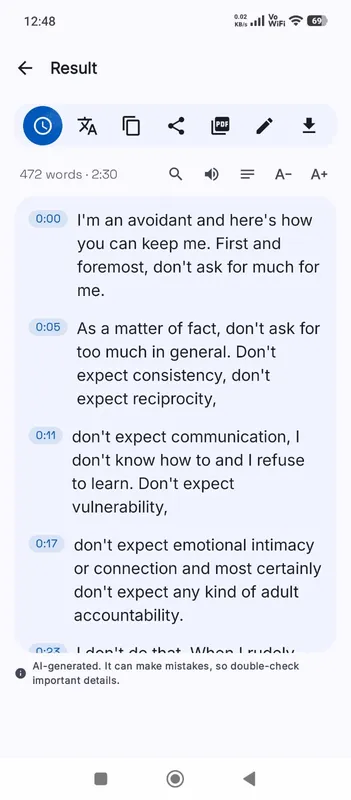
    The Local AI engine writes the episode down on your device and shows each line as it finishes.

  3. Publish the text

    Clean up names, then export TXT for your site, SRT for video platforms, or DOCX to edit show notes.

Why it works

Why OmniaScribe

  • Unreleased episodes stay unreleased

    Embargoed interviews and early cuts are transcribed without leaving your computer.

  • No per-hour bill

    Weekly shows add up fast with paid services. Here every episode is free.

  • Captions for video podcasts

    Export SRT or VTT for the video version on YouTube or social clips.

  • Find the clip

    Search the text for a topic and click the line to hear where the good moment starts.

What a transcript does for a podcast

Audio on its own is invisible to search engines and inaccessible to deaf and hard-of-hearing listeners. A transcript fixes both. Published on the episode page, it gives search engines the words you actually said, which helps the episode turn up for the topics you covered. It lets people skim an episode before they commit an hour to it, and it makes quoting your show easy for other writers. It is also the quickest way to write show notes: the summary is already there in your own words.

Transcribe the final mix

Run the transcript on the finished episode rather than the raw tracks, so the timestamps match what listeners hear. If your intro has a music bed, choose the spoken language yourself instead of using detection. Theme music and stingers are skipped or produce a stray line you can delete. Ad reads come out as ordinary speech, so you can trim them from the published text if you like.

If you record each host on a separate track, a transcript of one clean track is more accurate for that voice. For publishing, though, the mixed episode is usually the better choice.

Hosts, guests and names

OmniaScribe does not tell voices apart, so the transcript is one stream of lines. Add the host and guest names with Edit where the speaker changes; in a two-person show the turns are usually easy to spot. Guest names, brand names and show-specific jargon are the words most often misspelled. Fix them once and search the transcript for each so nothing slips through.

Clips and video versions

For short social clips, search the transcript for the moment, note its timestamp and cut the clip in your editor. For the full video version, export SRT and upload it next to the video on YouTube, where captions also help the episode get found.

Long episodes

Episodes over two hours may pass what a model can handle on your device. The workspace checks the length first. Split very long episodes at a break and transcribe both parts.

For a back catalogue, work through it a few episodes at a time on a laptop. Each transcript is saved in History under the episode’s file name, so naming files with the episode number before you start keeps everything in order. Then publish the transcripts one by one as you update the old episode pages; even older episodes gain from being readable and searchable.
Specs

Formats and limits

Audio
MP3, WAV, M4A, AAC, FLAC, OGG, OPUS
Video
MP4, MOV, MKV, WEBM
Export
TXT, PDF, DOCX, SRT, VTT
Languages
99, or detect automatically
Longest file per model
ModelComputerPhone
Fast3 h1 h 30 min
Standard2 h1 h
High accuracy1 h30 min

Files that would take more than about 45 min on your device ask before they start.

FAQ

Questions, answered.

Something else on your mind? Email us and a person replies.

Is my episode uploaded?

No. It is transcribed in your browser on your device, even before it is published.

How long can an episode be?

On a computer, Fast handles up to 3 h, Standard handles up to 2 h, High accuracy handles up to 1 h. On phones it's half of that. Split longer episodes into parts.

Does it name the hosts and guests?

No. Add names with Edit; the timing of each line stays the same.

What should I publish on my website?

Export TXT with timestamps off for a clean read, or with them on so readers can find the moment.

Can I make captions for a video podcast?

Yes. Export SRT or VTT from the result and upload it with the video.

Does background music cause problems?

A quiet music bed is fine. Loud music under the voice leads to more mistakes in those parts.

Guides

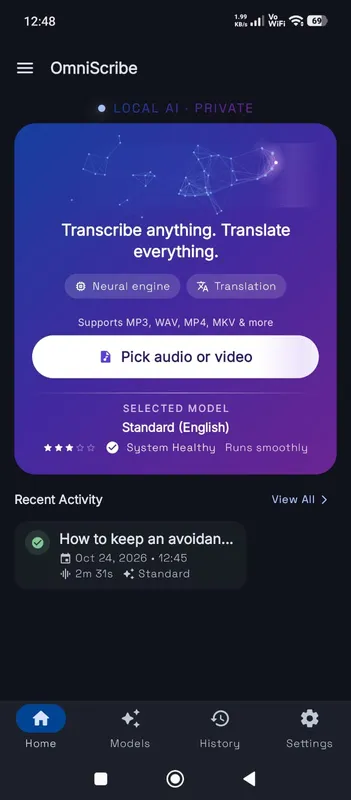
OmniScribe for Android

Transcribe anywhere.
No signal needed.

Install the free Android app and turn recordings into text on your phone, even with the screen off. Your audio never leaves the phone.

  • Works offline after a one-time model download
  • Translates offline, too
Get it on Google Playfree with ads · optional Pro
The OmniScribe home screen