Skip to content
Transcribe

MP3 to text, right in your browser

Turn an MP3 into editable, timed text on your own device, with no upload and no account.

  • Nothing uploaded
  • No sign-up
  • Free
or drop it here · MP3 WAV M4A MP4 MKV MOV FLAC OGG
Nothing is uploaded
How it works

Three steps, all on your device

  1. Choose the MP3

    Pick it from your files or drag it onto the card. Downloads, recorder exports and podcast episodes all work.

  2. Let it transcribe

    The Local AI engine decodes the MP3 and writes the speech down, line by line, while you watch.

  3. Save the text

    Correct anything that sounds off, then copy the text or save it as TXT, PDF, DOCX, SRT and VTT.

Why it works

Why OmniaScribe

  • No upload queue

    The MP3 is read straight from your disk by the browser. Nothing waits on a server.

  • Free for every file

    No credits, no minutes to buy. Transcribe one MP3 or a hundred.

  • Works offline afterwards

    Once the speech model is stored, you can transcribe MP3s on a train or a plane.

Why MP3 is easy to transcribe

MP3 is the format most audio ends up in: podcast episodes, audiobook chapters, exported phone calls, files from cheap voice recorders and the audio you save from a video editor. Every browser can decode it without help, so an MP3 opens quickly and almost never fails. The compression that keeps MP3 files small removes sounds people can barely hear, and speech survives it well. Even a low bitrate such as 64 kbps is usually enough for a clean transcript of a single voice.

When an MP3 gives poor results

The problems are almost always in the recording, not the format. An MP3 made from a phone held at arm’s length in a busy room will have more mistakes than one made with a headset. Very low bitrates, below 32 kbps, can make consonants smear together, which shows up as wrong short words. Music mixed loudly under the voice is the other common cause: the model tries to follow the speech, but lyrics and loud beats get in the way.

If a transcript has many mistakes, try the Standard or High accuracy model before anything else. They are slower and larger, but they recover far more words from a difficult file than Fast does.

Podcasts, audiobooks and recorded calls

For a podcast episode, choose the spoken language yourself, because many episodes open with a music sting that can confuse auto-detect. For an audiobook chapter, the result is a clean, searchable copy of the narration. For recorded calls exported as MP3, OmniaScribe writes one stream of timed lines; it does not label who is speaking, so add names with Edit where you need them.

Splitting very long MP3 files

Long MP3s, such as a full day of recorded talks, can go past what a model handles on your device. A free audio editor can cut the file into parts at natural breaks. Transcribe each part, and every one is saved in History as its own transcript, so you can export them one by one and join the text afterwards.

What you get back

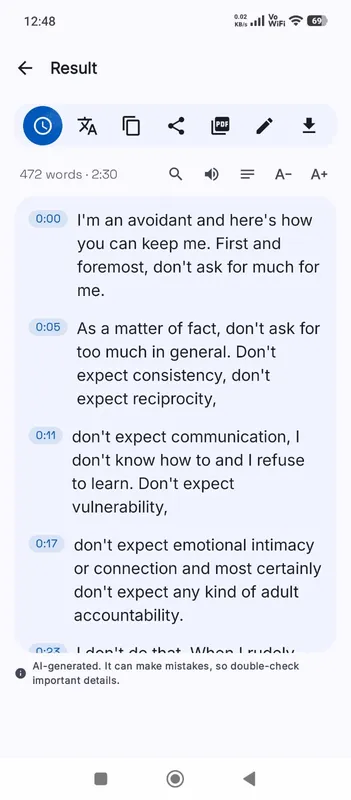
The transcript opens with every line timed to the MP3. Click a line and the player jumps to that moment, which makes checking a quote fast. Turn timestamps on or off before you copy the text. Exported subtitles keep the timing, and a DOCX or PDF gives you a document you can share, print or annotate.
Specs

Formats and limits

Audio
MP3, WAV, M4A, AAC, FLAC, OGG, OPUS
Video
MP4, MOV, MKV, WEBM
Export
TXT, PDF, DOCX, SRT, VTT
Languages
99, or detect automatically
Longest file per model
ModelComputerPhone
Fast3 h1 h 30 min
Standard2 h1 h
High accuracy1 h30 min

Files that would take more than about 45 min on your device ask before they start.

FAQ

Questions, answered.

Something else on your mind? Email us and a person replies.

Is my MP3 uploaded to a server?

No. The browser reads the file from your device and the Local AI engine transcribes it there. Only the speech model is downloaded, once.

Does the MP3 bitrate matter?

A little. 64 kbps and above is fine for speech. Very low bitrates can blur short words and lead to more mistakes.

How long can the MP3 be?

On a computer, Fast handles up to 3 h, Standard handles up to 2 h, High accuracy handles up to 1 h. On phones it's half of that. OmniaScribe checks the length before it starts.

Can I transcribe a podcast MP3?

Yes. Download the episode file, then pick it here. Choose the spoken language if the episode starts with music.

Will it separate different speakers?

No. The transcript is one stream of timed lines without speaker names. You can add names yourself with Edit.

Can I get subtitles from an MP3?

Yes. Export SRT or VTT from the result; each cue is timed to the audio.

Guides

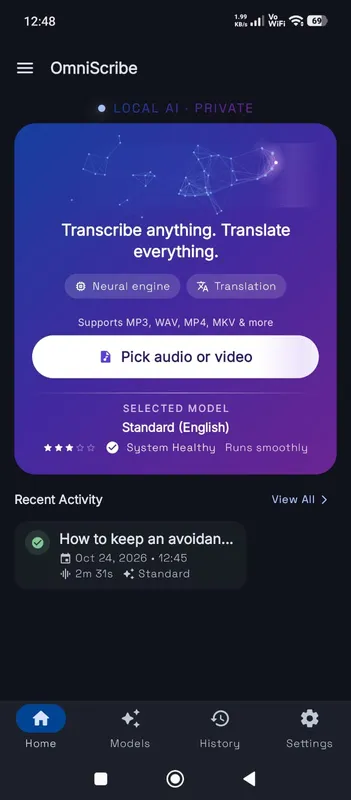
OmniScribe for Android

Transcribe anywhere.
No signal needed.

Install the free Android app and turn recordings into text on your phone, even with the screen off. Your audio never leaves the phone.

  • Works offline after a one-time model download
  • Translates offline, too
Get it on Google Playfree with ads · optional Pro
The OmniScribe home screen